
More articles and topics
Turnstile controller is beeping loudly
- Before you start
- After rewiring, the entry and exit readers must have the different DIP switch addresses 1 and 2.
- Where to find it
- Card readers, controller and wiring at the turnstile
- How to check the result
- The reader lights and online status show whether power and communication are available again.
On this page
Quick answer
A continuous beep indicates a communication problem between the controller and card readers. Use the reader lights to check power and data wiring first; after rewiring, the entry and exit readers must have different DIP switch addresses (1 and 2).
Cause
A continuous beep from the controller indicates a communication problem between the controller and the card readers.
Diagnosis: Are the card readers lit?
Neither card reader is lit, or only one is
The unlit reader has no power.
Solution: Check the power supply of the affected card reader and restore it.
Both card readers flash green
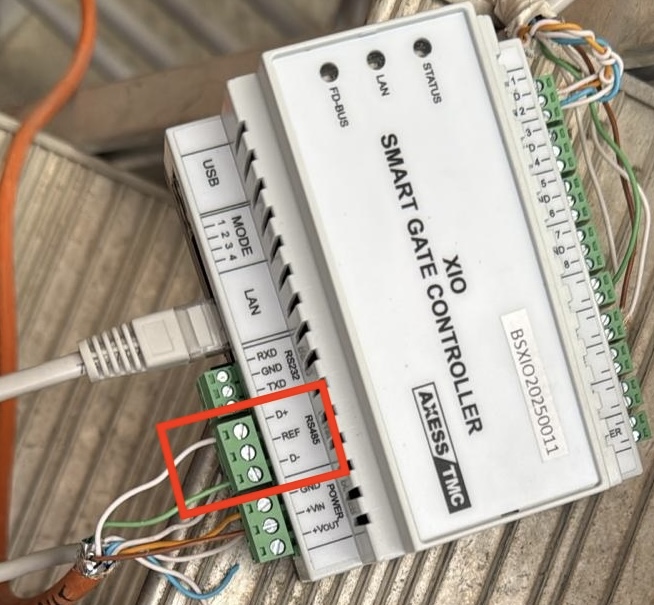
Check the cables at the top of the turnstile leading to the controller’s D+ and D- terminals.
Both card readers are lit
The data cables are connected incorrectly, not connected, or damaged.
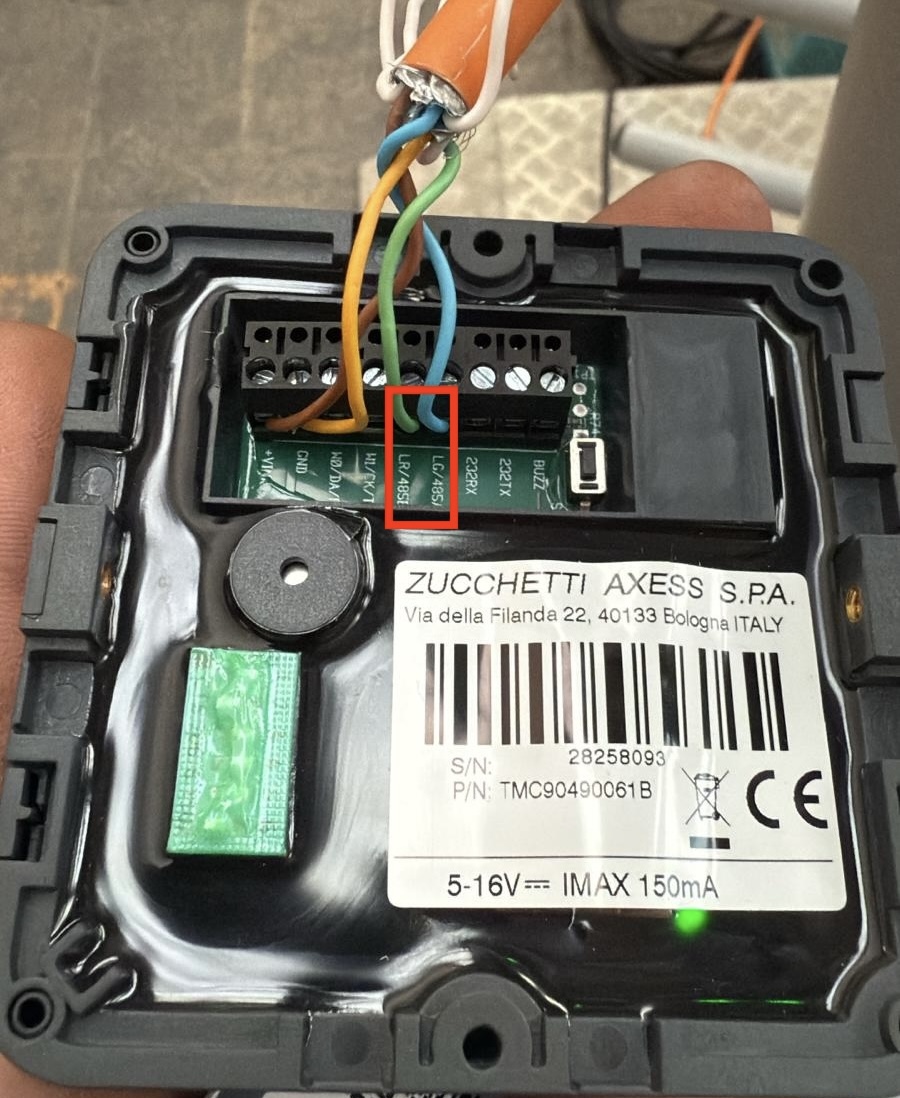
Check the following connections:
| Device | Terminals |
|---|---|
| Controller | D+ / D- |
| Card reader | A / B |
Possible causes:
- Cables swapped (D+ on D- or A on B)
- Cable break (e.g. due to mechanical stress)
- Cable has come loose
Solution: Check the wiring between the controller and the card readers and connect it correctly. Make sure D+ is connected to A and D- to B.
One reader lights up red, the other yellow
Example: the exit reader lights up red, the entry reader lights up yellow.
Cause: The reader lit yellow has no connection to the controller (e.g. broken or loose cable).
Solution: Check the cable connection at the yellow-lit reader and reattach it correctly.
Check online status
At app.bausicht.com > Access points → List, a red warning icon with the notice Fault: Cable connection interrupted appears next to the name of the affected access point if the controller cannot reach a card reader. The Online status column shows whether the controller is connected to Bausicht.
After rewiring: check the card readers’ DIP switch addresses
If the beeping occurs after rewiring or an initial installation of the turnstile, the cause is often an incorrect DIP switch configuration of the card readers.
Problem
Each card reader needs a unique address so the controller can identify it correctly. If the DIP switches are set incorrectly, both readers have the same address or an invalid address - the controller cannot communicate with them and beeps.
Solution
- Check the DIP switches on both card readers. The addresses of the entry reader and the exit reader must be different.
- Set the correct addresses:
- Entry reader: address 1
- Exit reader: address 2
- After changing the DIP switches, restart the controller (briefly disconnect the power and reconnect it).
Note: The exact DIP switch layout varies depending on the card reader model. If in doubt, check the data sheet of the respective reader.
Need further help?
If the beeping persists after the steps above, contact our support team with the construction site and controller ID.